
In today’s cloud-driven world, managing and enforcing organizational policies across a sprawling cloud environment can be a complex and challenging task. Microsoft Azure provides robust tools to help organizations maintain compliance and adhere to best practices through Azure Policy and governance frameworks. This blog will delve into the essentials of Azure Policy, how to implement it, and the best practices for effective governance in Azure.
What is Azure Policy?
Azure Policy is a service in Azure that you can use to create, assign, and manage policies. These policies enforce different rules and effects over your resources, so those resources stay compliant with your corporate standards and service-level agreements (SLAs). Azure Policy helps to bring order and structure by applying consistent policies across your Azure environment.
Key Components of Azure Policy
1. Policy Definitions:
A policy definition is a rule that you want to enforce. For example, you might have a policy that specifies that only certain VM sizes are allowed in your environment. Azure provides built-in policy definitions, and you can also create custom ones.
2. Initiatives:
An initiative is a collection of policy definitions that are tailored towards achieving a singular goal. By grouping policies into initiatives, you can simplify the management and assignment of multiple policies.
3. Assignments:
A policy assignment is the application of a policy or initiative to a specific scope. Scopes can range from a management group to a subscription, a resource group, or even an individual resource.
4. Parameters:
Parameters allow you to customize policy definitions by providing dynamic values when you assign policies. This flexibility makes it easier to reuse policy definitions across different scopes.
Implementing Azure Policy
1. Creating a Policy Definition:
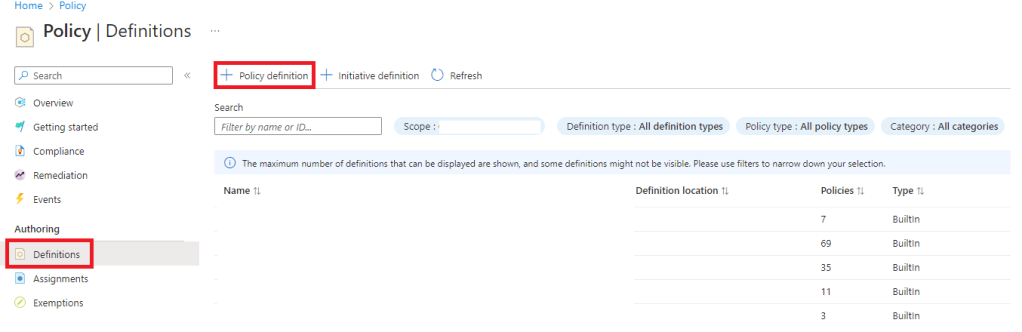
To create a policy, navigate to the Azure Policy service in the Azure portal. Click on “Definitions” and then “+ Policy definition.” Define the rule using JSON format, specifying the conditions and the actions (effects) to be taken when the policy is violated.
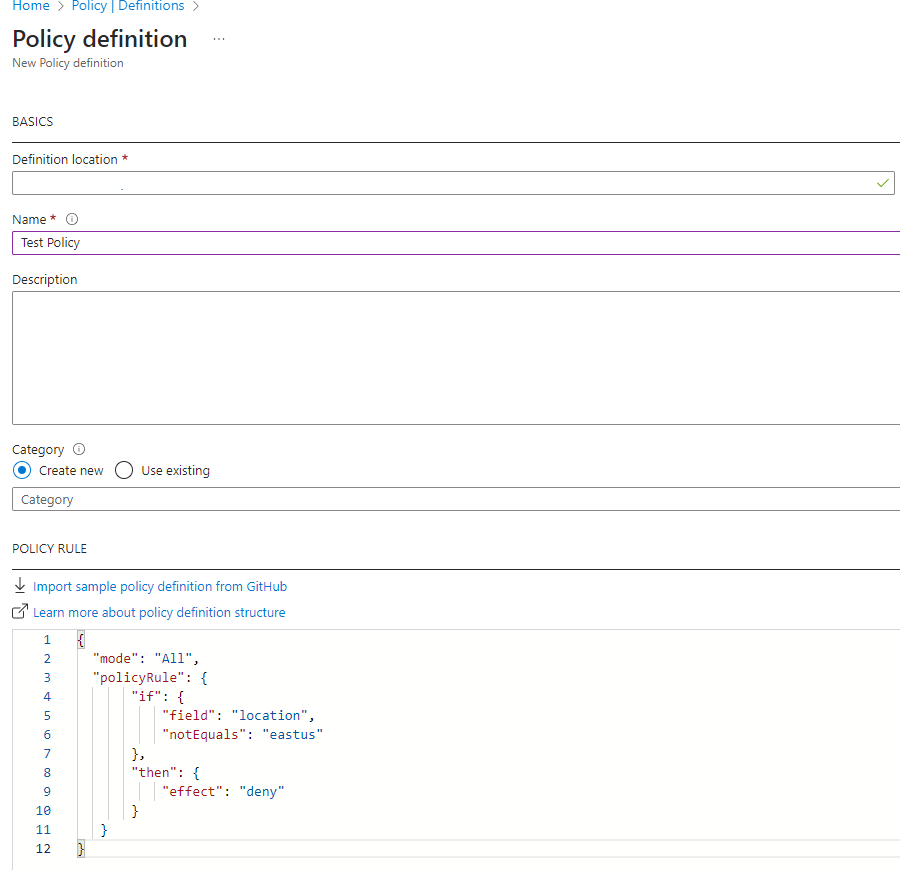
Following policy allows resources to be created in only “eastus” region.
{
“mode”: “All”,
“policyRule”: {
“if”: {
“field”: “location”,
“notEquals”: “eastus”
},
“then”: {
“effect”: “deny”
}
}
}
2. Creating an Initiative:
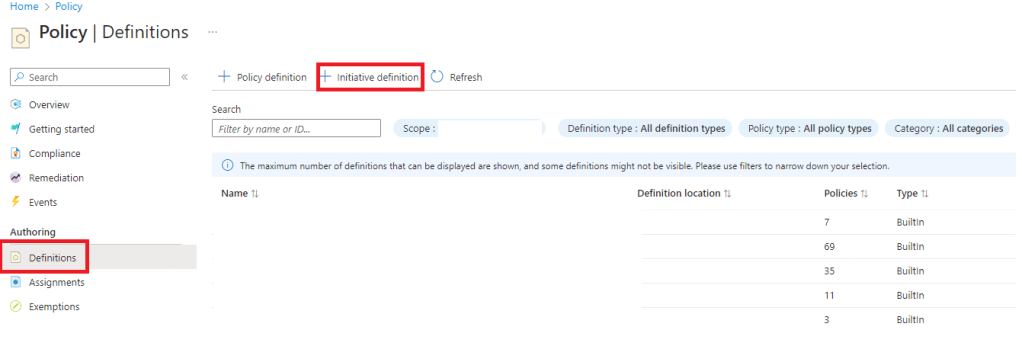
Once you have your policy definitions, you can create an initiative by grouping related policies. Navigate to “Definitions” and then “+ Initiative definition.” Add the relevant policy definitions created earlier to the initiative.
3. Assigning Policies or Initiatives:
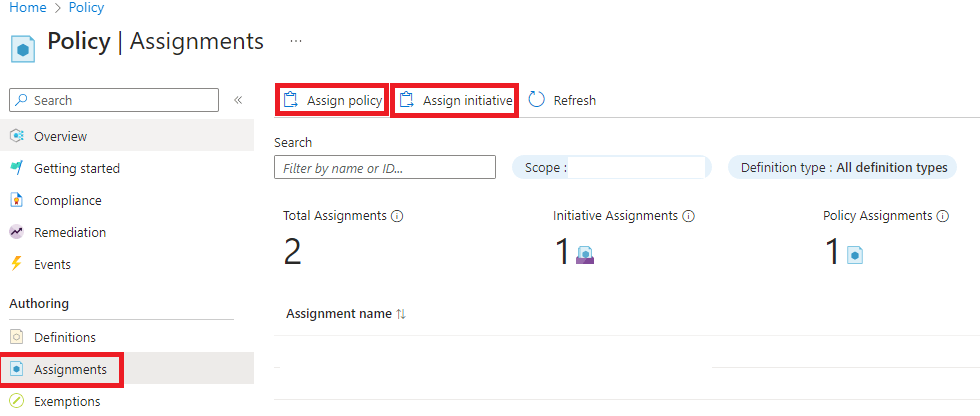
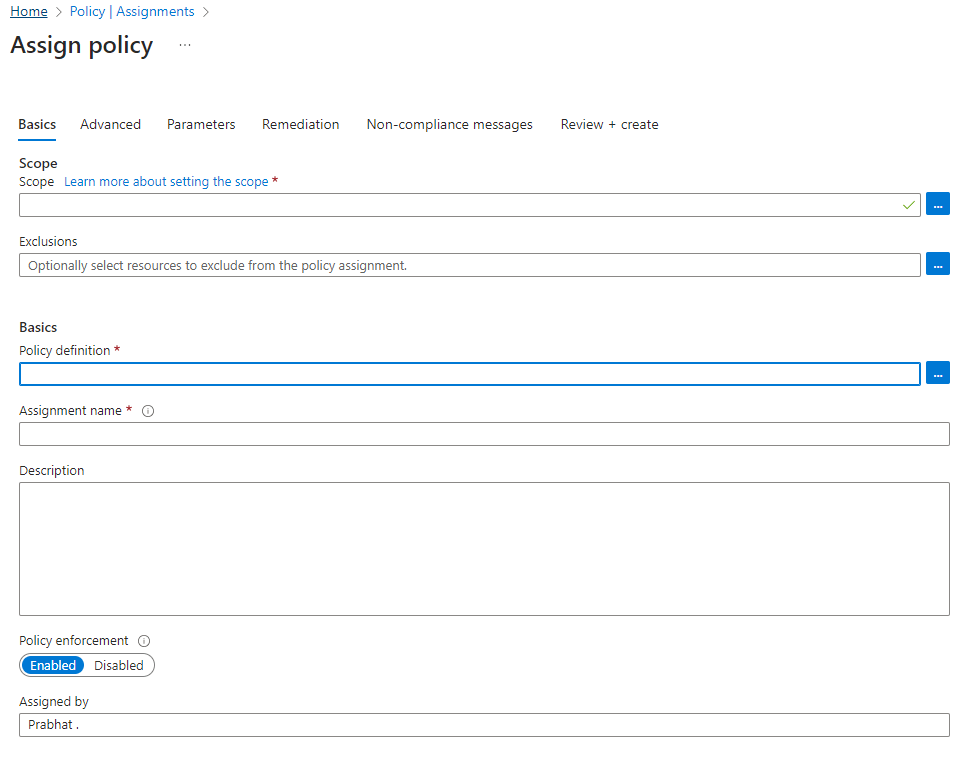
Assign your policy or initiative to a scope by navigating to “Assignments,” clicking “Assign policy” or “Assign initiative” and selecting the desired scope. Customize the parameters as needed.
4. Monitoring and Remediation:
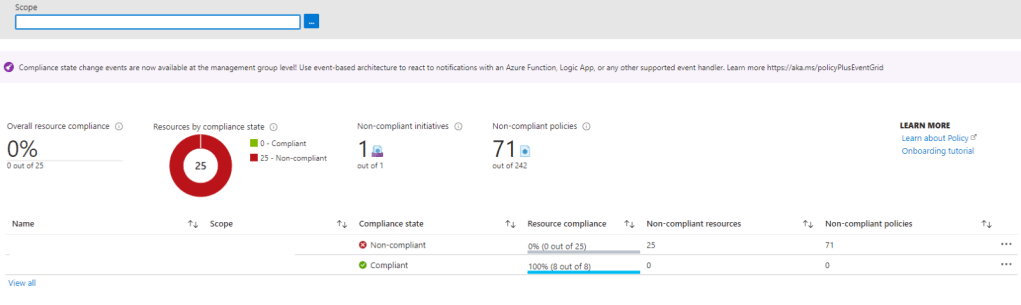
After assigning policies, Azure Policy continuously evaluates resources and provides a compliance dashboard where you can view the compliance state of your resources. For non-compliant resources, you can create remediation tasks to bring them into compliance.
Best Practices for Azure Governance
1. Define a Clear Governance Strategy:
Start by defining what compliance means for your organization. Identify the key policies that need to be enforced and ensure alignment with organizational goals.
2. Leverage Built-in Policies:
Azure provides a wide range of built-in policy definitions for common governance needs. Use these as a foundation and customize them to fit your specific requirements.
3. Use Management Groups for Scalability:
Organize your subscriptions into management groups to apply policies consistently across your entire organization. This structure allows for scalable policy management as your Azure environment grows.
4. Regularly Review and Update Policies:
Governance is not a one-time task. Regularly review and update your policies to adapt to changing compliance requirements and organizational needs.
5. Automate Remediation:
Where possible, automate the remediation of non-compliant resources using Azure Policy’s remediation tasks. This approach ensures quicker compliance and reduces manual intervention.
6. Monitor Compliance Continuously:
Use Azure Policy compliance reports and alerts to monitor the state of your environment continuously. Integrate these reports with your overall security and compliance monitoring tools for a comprehensive view.
Conclusion
Azure Policy and governance frameworks are essential tools for maintaining control and ensuring compliance in your Azure environment. By defining clear policies, leveraging built-in tools, and continuously monitoring compliance, you can manage your cloud resources effectively and align them with organizational standards. Start implementing Azure Policy today to bring order to your cloud operations and stay ahead in the ever-evolving landscape of cloud governance.
Author: Prabhat, is a seasoned IT professional, boasting over a decade of experience in the field of Operations and Infrastructure Support. His expertise spans across Azure Cloud and Windows on-prem platforms. A fervent enthusiast of Azure, he backs up his passion with a wealth of knowledge underlined by multiple Azure certifications.
 Azure4you By Lalit Rawat
Leave a comment