Within this blog post, I introduce a solution designed to facilitate the generation of customer feedback through the seamless integration of diverse tools available on the Microsoft Azure platform. The core objective of this approach is to optimize the feedback collection process by eliminating the requirement for supplementary steps, such as initiating phone calls to gather feedback following each support interaction. By leveraging the capabilities of Microsoft Azure, the solution seeks to create a more efficient and automated mechanism for obtaining valuable insights from customers. This not only enhances the overall workflow by reducing manual interventions but also contributes to a more agile and responsive feedback system. The integration of Azure tools not only aligns with modern technological advancements but also underscores the commitment to providing a customer-centric approach, ensuring that feedback is seamlessly woven into the support process without necessitating additional, time-consuming steps.
🚩 Problem Statement:
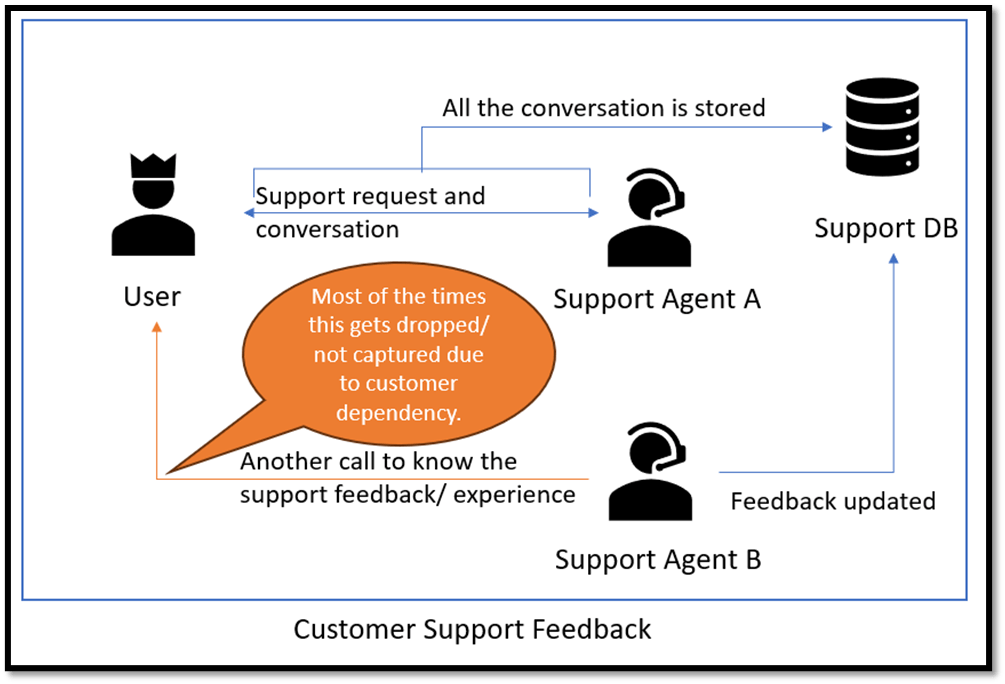
As per established support protocols, a standard operating procedure involves the systematic engagement of customers following a support conversation. This entails initiating additional communication, either through email or a follow-up call, to incorporate insightful feedback. The objective is to comprehensively assess customer satisfaction levels and pinpoint areas for improvement. This meticulous approach not only reinforces a commitment to customer-centricity but also serves as a valuable channel for addressing any concerns promptly. By integrating this feedback loop into the support process, we aim to enhance overall service quality and ensure a positive and proactive customer experience. And here is the pictorial representation of the problem statement:
📗 Solution:
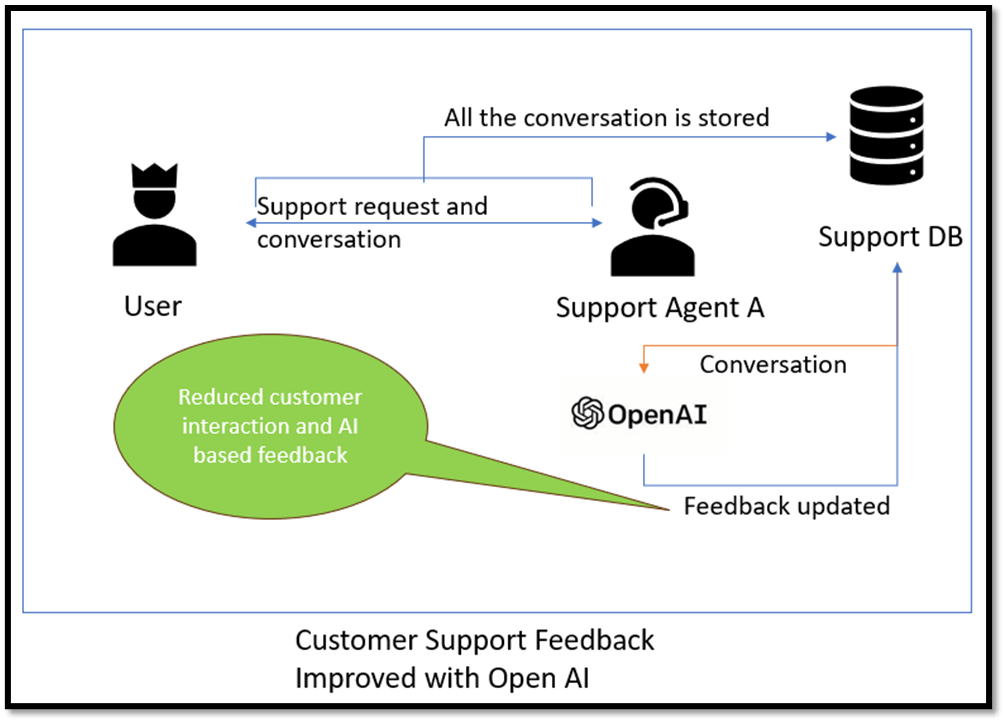
This proposed solution is designed to streamline our current operational workflow by eliminating a specific step in the process. Specifically, it aims to automate the generation of feedback for each support ticket. By implementing this solution, we intend to enhance efficiency and responsiveness in our support system. The automation process will prompt the system to proactively gather feedback without the need for manual intervention, thereby reducing the workload associated with this task. This enhancement not only simplifies the overall support procedure but also expedites the feedback collection process. Automated feedback generation is expected to provide valuable insights into customer satisfaction and areas that may require attention or improvement. Ultimately, this solution seeks to optimize our support operations, ensuring a more seamless and customer-centric approach while simultaneously empowering our team to focus on other critical aspects of customer service and issue resolution. And here is a pictorial representation of the solution :
✉️ Architecture Diagram:

Here are the steps to build it for your environment:
- Create an Azure AI Instance
Step 1: Fill the basic details.

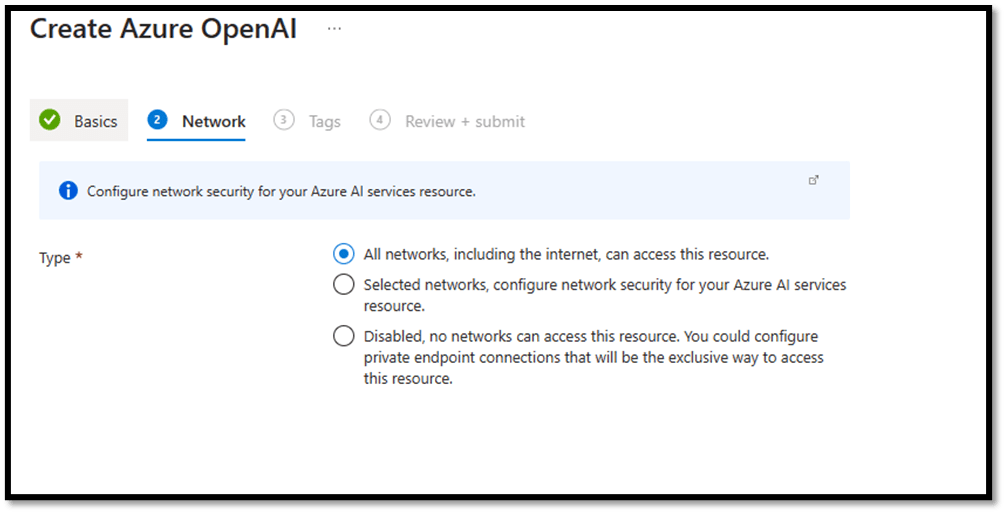
Step 2: Fill the networking.
After creating, it will look like,

2. Create a PowerShell Function
Step1: Fill in the basic details.

Step2: Add a http trigger:

Step 3: Add the bellow code:
using namespace System.Net
# Input bindings are passed in via param block.
param($Request, $TriggerMetadata)
$maxTokens=800
$textToSummarize=$Request.Body.FeedBackText
$apiKey=“<api key>”
$uri = “<open ai api URL>”
$postIssueBody =@([pscustomobject]@{role = “system”;content = “Could you please read the below conversation and provide a customer satisfaction result with any of the options as good, bad, worst ” + $textToSummarize})
$headers = @{
‘api-key’ = $apiKey
‘Content-Type’ = ‘application/json’
}
$body = @{
messages = $postIssueBody
max_tokens = 800
temperature = 0.7
frequency_penalty = 0
presence_penalty = 0
top_p = 0.95
stop = $null
} | ConvertTo-Json
$parameters = @{
Method = ‘POST’
URI = $uri
Headers = $headers
Body = $body
ErrorAction = ‘Stop’
}
$response = Invoke-RestMethod @parameters
$body =$response.choices[0].message.content
Write-Host $body
# Associate values to output bindings by calling ‘Push-OutputBinding’.
Push-OutputBinding -Name Response -Value ([HttpResponseContext]@{
StatusCode = [HttpStatusCode]::OK
Body = $body
})
3. Collect the key from open ai api URL and key from the Open AI instance

4. Pass the conversation

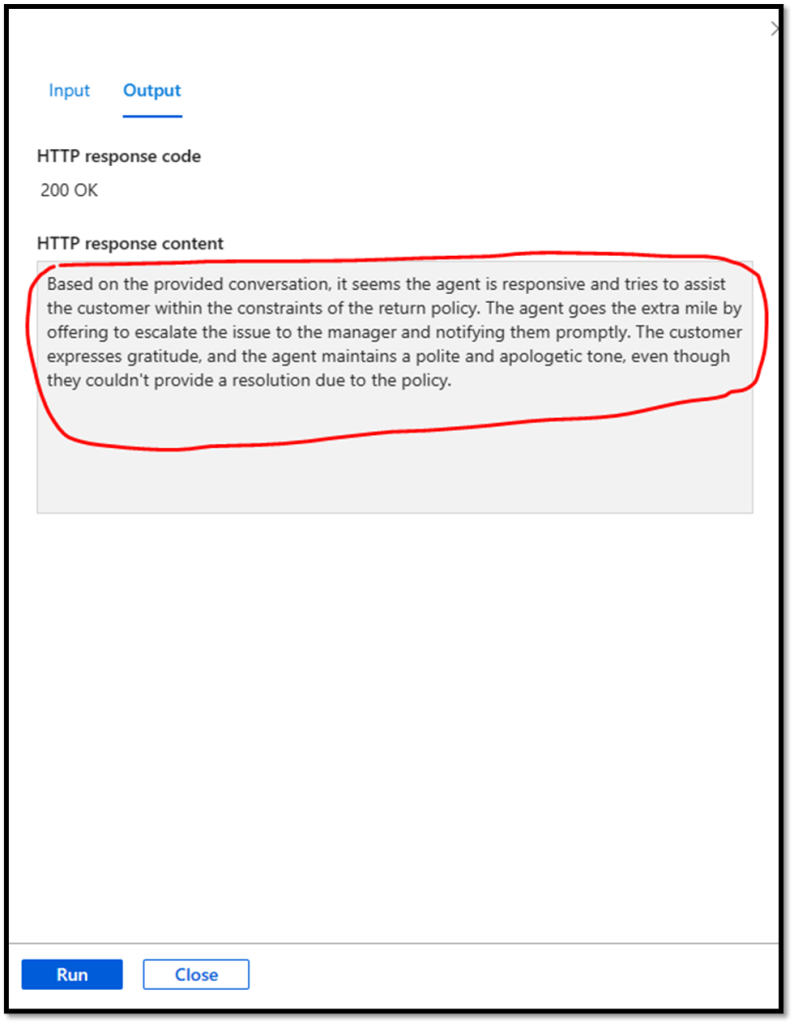
5. View the Result:
⚙️ Custom configurations:
Tailoring this solution to your specific needs is easily achievable with a few customizable aspects.
Firstly, you have the flexibility to select the language of your choice when crafting the Azure Function, allowing seamless integration into your existing language preferences.
Additionally, you can fine-tune and optimize prompts to suit the unique requirements of your solution. This customization empowers you to align the solution with your distinct linguistic and functional preferences, ensuring a tailored and effective implementation that caters precisely to the nuances of your

Challenges faced :
Several significant challenges were encountered in the development of this solution.
- Firstly, selecting the appropriate model in OpenAI posed a considerable hurdle. After thorough research, it was determined that ChatGPT 3.5 was the most suitable choice, aligning seamlessly with the project’s ease-of-use and efficiency requirements.
- Another notable challenge involved crafting precise prompts and accurately capturing customer satisfaction levels (good, bad, worst). This task demanded expertise and time, as formulating the right prompts is crucial for obtaining meaningful and accurate feedback. Achieving this required a nuanced understanding of language and customer sentiment to ensure the effectiveness of the feedback-generating process.
- Additionally, the model’s token limit posed a constraint. Effectively breaking down the input within the token limit was imperative for optimal model performance. This challenge required careful consideration of input structure and content to maximize the efficiency of the solution.
In summary, overcoming these challenges involved meticulous research, language expertise, and strategic planning to ensure the seamless integration and effective functioning of the solution in generating valuable customer feedback.
👍 Business Benefits:
The implementation of this solution promises a myriad of business benefits, addressing critical aspects of operational efficiency and customer satisfaction.
- Firstly, there is a substantial reduction in the total volume of customer calls. By automating the feedback generation process, the need for extensive follow-up calls is minimized, allowing for a more streamlined and resource-efficient communication strategy.
- Furthermore, the solution significantly diminishes customer interactions without compromising the quality of engagement. This reduction in interactions contributes to an improved overall customer experience, as it streamlines communication, minimizing potential disruptions in the customer journey.
- Moreover, a noteworthy benefit is the alleviation of workload and dependency on support executives. With the automation of feedback collection, support teams can focus on more intricate and personalized customer queries, enhancing the overall efficiency of support operations.
- Additionally, by choosing ChatGPT 3.5 as the underlying model, the solution ensures an optimal balance between ease of use and efficiency. This model selection contributes to the solution’s effectiveness in generating relevant and contextually appropriate feedback.
In conclusion, the implementation of this solution not only leads to resource optimization and enhanced operational efficiency but also nurtures a more positive and efficient customer experience, ultimately contributing to the overall success and effectiveness of the business.
 Azure4you By Lalit Rawat
Leave a comment